
GPT-Image-2
GPT-Image-2 is OpenAI's image generation model launched in April 2026. It supports up to 2K resolution, strong in-image text rendering, and multi-image editing. Available through Clauddy's OpenAI-compatible /v1/images/generations endpoint.
Playground (Easiest Way)
No code needed — generate images directly in the Clauddy web UI:
- Go to the Clauddy Playground (click 操练场 in the left sidebar)
- Select
gpt-image-2from the model dropdown - Type your prompt in the input box at the bottom (e.g. "A cute cat sitting on the moon") and hit send
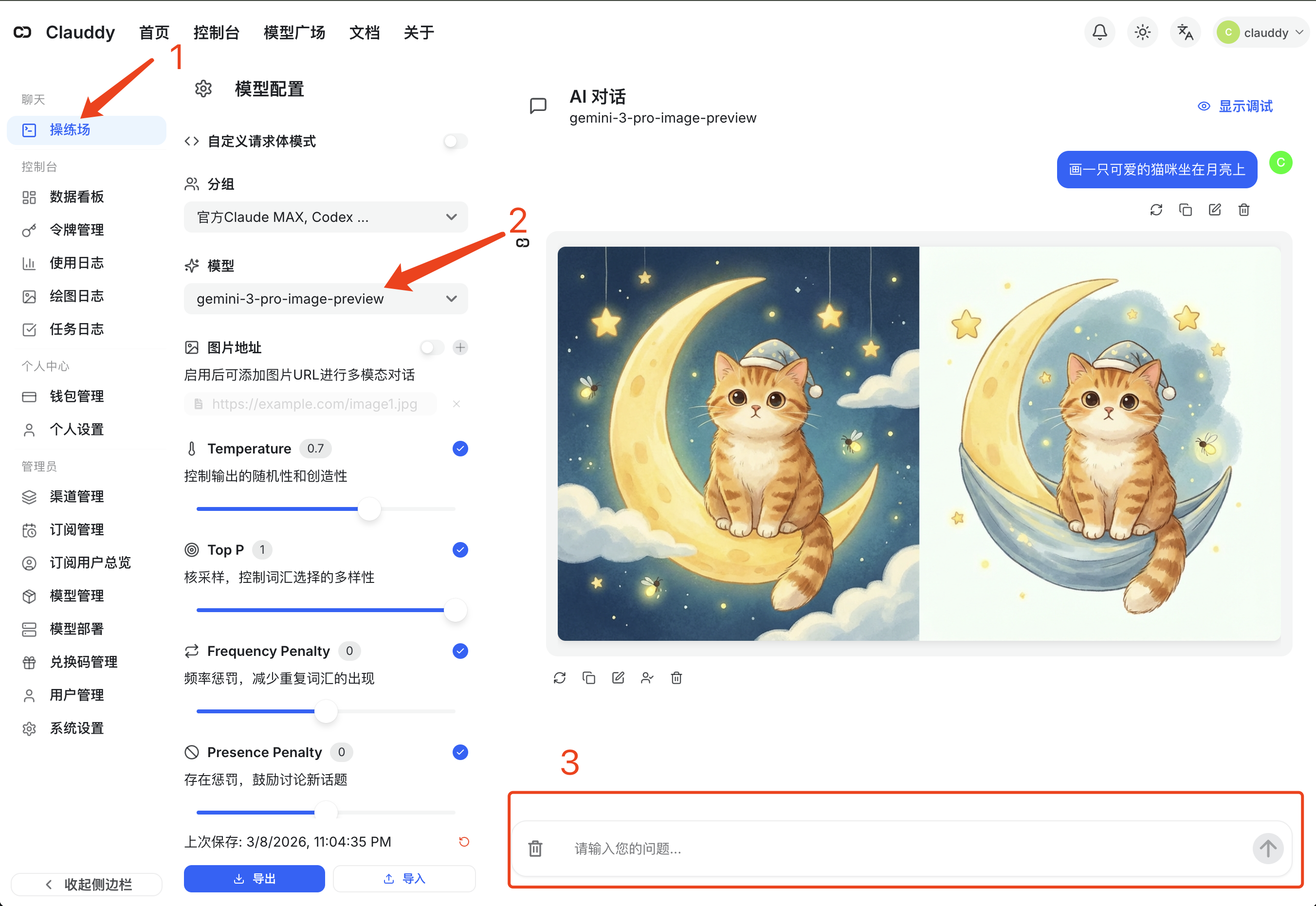
The generated image will appear directly in the chat area — right-click to save.
Quick CLI Test (No Client Install)
Fastest way to verify — one curl + Python base64 decode:
TOKEN="sk-you...oken"   # your Clauddy token

curl -sS https://clauddy.com/v1/images/generations \
  -H "Authorization: Bearer $TOKEN" \
  -H "Content-Type: application/json" \
  -d '{
    "model": "gpt-image-2",
    "prompt": "a cute cat sitting on the moon, digital illustration",
    "size": "1024x1024",
    "n": 1
  }' \
  | python3 -c "import sys,json,base64; open('output.png','wb').write(base64.b64decode(json.load(sys.stdin)['data'][0]['b64_json']))" \
  && echo "Saved output.png"
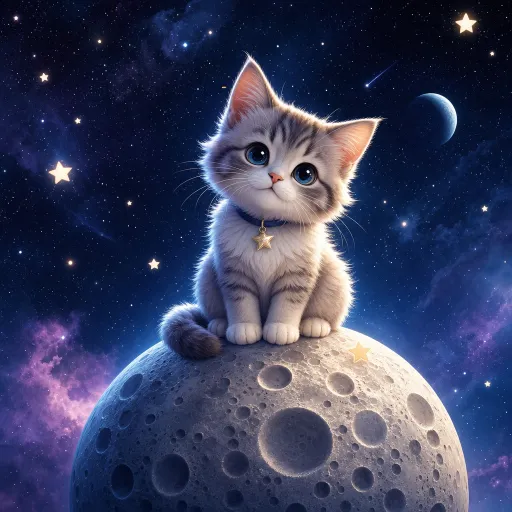
You'll get output.png in the current directory. Example output:
About the response format
gpt-image-2 always returns base64 (b64_json field) — response_format=url is not supported. This differs from the DALL·E family; the client must decode it.
API Usage (Developers)
Model Info
- Model name:
gpt-image-2 - Endpoint:
POST https://clauddy.com/v1/images/generations(text-to-image) - Edit endpoint:
POST https://clauddy.com/v1/images/edits(image-to-image, multipart/form-data) - Response: always
b64_json - Latency: ~30–60s for 1024×1024, up to 1–2 min for 2K. Set client timeouts to ≥ 300 seconds.
Key Parameters
| Param | Values | Notes |
|---|---|---|
model | "gpt-image-2" | Required |
prompt | string, up to ~32 000 chars | Required, supports English and Chinese |
size | "1024x1024" / "1536x1024" / "1024x1536" / "2048x2048" / "auto" | Default auto |
quality | "low" / "medium" / "high" / "auto" | Default auto |
n | 1–10 | Images per request |
background | "transparent" / "opaque" / "auto" | Transparent requires output_format=png or webp |
output_format | "png" / "jpeg" / "webp" | Default png |
Python
import base64
from openai import OpenAI

client = OpenAI(
    api_key="sk-you...oken",
    base_url="https://clauddy.com/v1"
)

resp = client.images.generate(
    model="gpt-image-2",
    prompt="a cute cat sitting on the moon, digital illustration",
    size="1024x1024",
    quality="high",
    n=1,
)

with open("output.png", "wb") as f:
    f.write(base64.b64decode(resp.data[0].b64_json))

print("Saved output.png")
Image Edits (multipart)
The /v1/images/edits endpoint accepts one or more input images (up to 16) and edits, restyles, or composes them based on a prompt. Note: the request body is multipart/form-data, not JSON.
One-shot curl edit
TOKEN="sk-you...oken"

curl -sS https://clauddy.com/v1/images/edits \
  -H "Authorization: Bearer $TOKEN" \
  -F "model=gpt-image-2" \
  -F "image[][email protected]" \
  -F 'prompt=Change the cat collar to bright red and add tiny round sunglasses. Keep everything else identical.' \
  -F "size=1024x1024" \
  | python3 -c "import sys,json,base64; open('edited.png','wb').write(base64.b64decode(json.load(sys.stdin)['data'][0]['b64_json']))" \
  && echo "Saved edited.png"
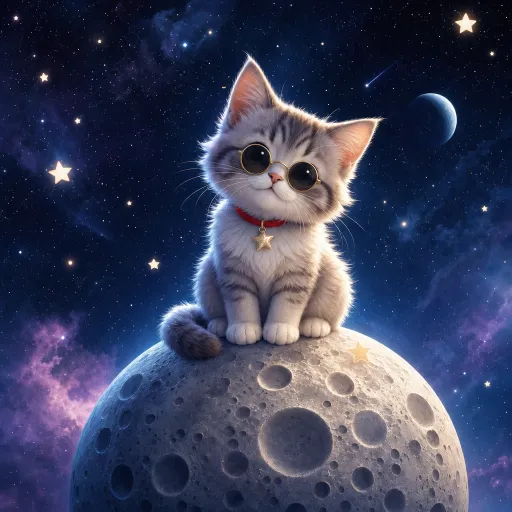
Before / after (input: the cat-on-the-moon from the previous section; prompt: add a red collar + tiny round sunglasses):
| Before | After |
|---|---|
|  |
Prompt tips
- Say "keep everything else identical" explicitly, or the model may redraw the whole scene
- To preserve composition, describe "same pose / angle / background"
- For style transfer, use "redraw this image in XXX style"
Python edit
import base64
from openai import OpenAI

client = OpenAI(
    api_key="sk-you...oken",
    base_url="https://clauddy.com/v1"
)

with open("input.png", "rb") as f:
    resp = client.images.edit(
        model="gpt-image-2",
        image=f,
        prompt="Change the cat collar to bright red and add tiny round sunglasses. Keep everything else identical.",
        size="1024x1024",
    )

with open("edited.png", "wb") as f:
    f.write(base64.b64decode(resp.data[0].b64_json))

print("Saved edited.png")
Multi-image composition / style transfer
Pass up to 16 images — useful for "redraw A in the style of B", "combine elements of A and B", etc.:
curl -sS https://clauddy.com/v1/images/edits \
  -H "Authorization: Bearer $TOKEN" \
  -F "model=gpt-image-2" \
  -F "image[][email protected]" \
  -F "image[]=@style_reference.png" \
  -F 'prompt=Redraw the subject from the first image in the watercolor style of the second image' \
  -F "size=1024x1024" \
  | python3 -c "import sys,json,base64; open('fused.png','wb').write(base64.b64decode(json.load(sys.stdin)['data'][0]['b64_json']))"
Inpainting (mask)
To edit only a specific region, pass a PNG mask (transparent area = region to modify):
curl -sS https://clauddy.com/v1/images/edits \
  -H "Authorization: Bearer $TOKEN" \
  -F "model=gpt-image-2" \
  -F "image[][email protected]" \
  -F "[email protected]" \
  -F 'prompt=Draw a flying parrot in the masked area' \
  -F "size=1024x1024" \
| python3 -c "import sys,json,base64; open('inpaint.png','wb').write(base64.b64decode(json.load(sys.stdin)['data'][0]['b64_json']))"| Param | Notes |
|---|---|
image[]=@file | Input image (up to 16, repeat the field) |
mask=@file | Optional mask; transparent pixels are the editable region |
input_fidelity | "high" / "low" — fidelity to source, edits endpoint only |
prompt | What to change |
Recommended Clients
Image-generation endpoint support varies a lot across clients. Ranked by ease:
🥇 Open WebUI — easiest setup
First-class image generation engine. Set:
ENABLE_IMAGE_GENERATION = true
IMAGE_GENERATION_ENGINE = openai
IMAGES_OPENAI_API_BASE_URL = https://clauddy.com/v1
IMAGES_OPENAI_API_KEY = sk-you...oken
IMAGE_GENERATION_MODEL = gpt-image-2
IMAGE_SIZE = 1024x1024
Click the image button in the chat UI to generate. Cleanest experience.
🥈 Cherry Studio — polished desktop UI
Has dedicated size / quality / n pickers. Gotcha: append a literal # to the API host (e.g. https://clauddy.com/v1/images/generations#) to stop Cherry Studio from rewriting the path to /chat/completions. Add the model name gpt-image-2 manually.
🥉 Chatbox — cross-platform, requires path override
Chatbox defaults to /chat/completions, so in a Custom Provider:
- Choose Custom provider type
- Set API Path to
/v1/images/generations - Set timeout to ≥ 360 seconds
- Set model name to
gpt-image-2
Chatbox limitation
Because /v1/images/generations is stateless, you can't do follow-up edits like "now make the collar red". Use the Playground or Cherry Studio for iterative editing.
Which Image Model Should I Pick?
| Use case | Recommendation |
|---|---|
| Realistic styles, posters, product shots, in-image text | GPT-Image-2 |
| Creative scenes, artistic styles, character consistency, anime | Nano Banana Pro (Gemini) |
| Transparent background PNG/WebP | GPT-Image-2 (native background=transparent) |
| Multi-turn "edit this part" conversation | Nano Banana Pro (chat endpoint, naturally multi-turn) |
Both have strengths — try the same prompt through both and compare.