
Nano Banana Pro
Nano Banana Pro (Gemini's image generation model) is available through Clauddy's API.
Playground (Easiest Way)
No code needed — generate images directly in the Clauddy web UI:
- Go to the Clauddy Playground (click 操练场 in the left sidebar)
- Select
gemini-3-pro-image-previewfrom the model dropdown - Type your prompt in the input box at the bottom (e.g. "A cute cat sitting on the moon") and hit send
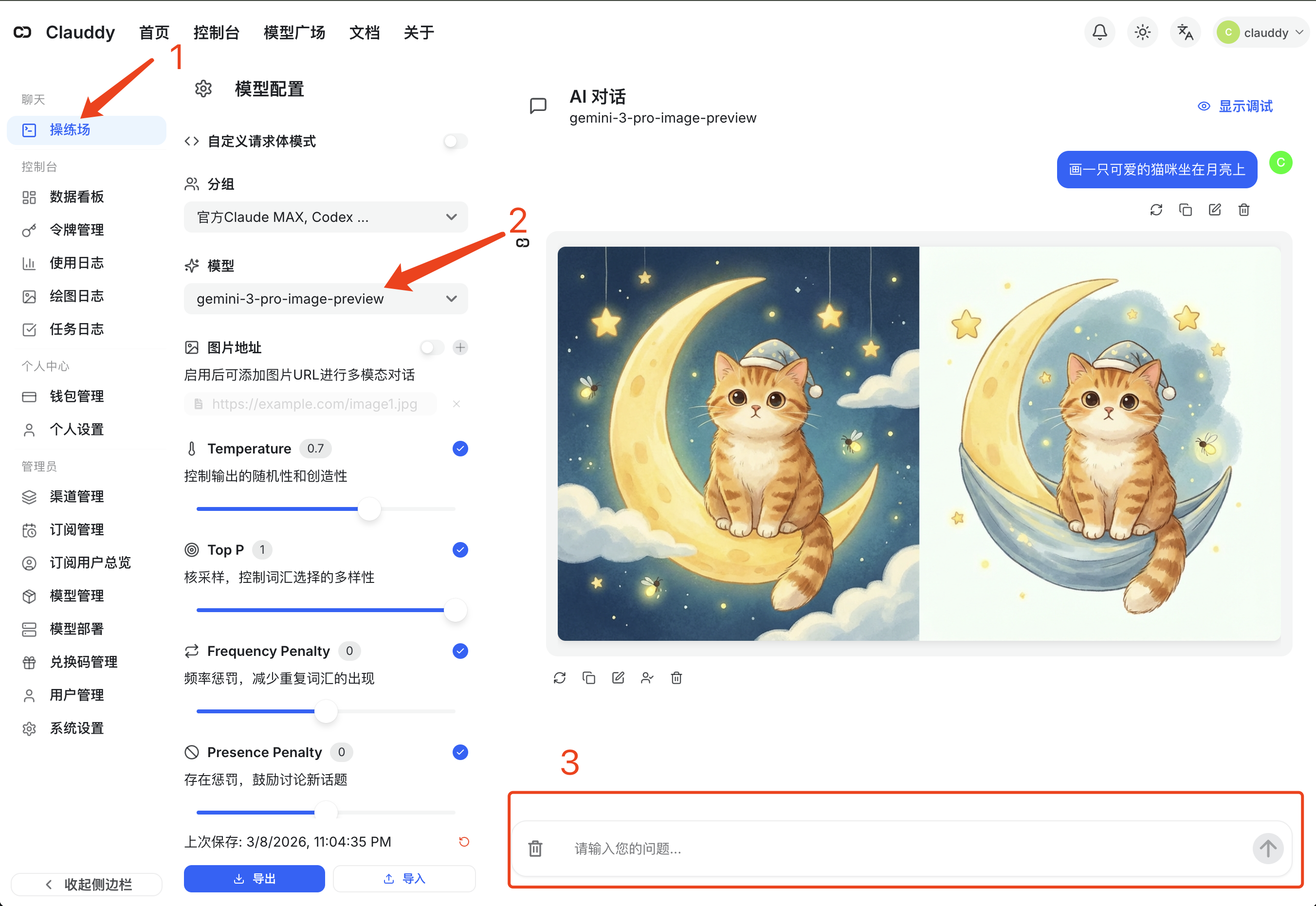
The generated image will appear directly in the chat area — right-click to save.
API Usage (Developers)
If you need to integrate image generation into your code, use Clauddy's OpenAI-compatible API.
Model Info
- Model name:
gemini-3-pro-image-preview - Capabilities: Text-to-image, image editing
- API format: OpenAI-compatible
Response Format
The model returns a standard OpenAI chat completion response. The generated image is embedded as a base64-encoded markdown image link in the content field:
You need to extract the base64 data and save it as an image file.
cURL
bash
curl -s https://clauddy.com/v1/chat/completions \
  -H "Content-Type: application/json" \
  -H "Authorization: Bearer sk-your-clauddy-token" \
  -d '{
    "model": "gemini-3-pro-image-preview",
    "messages": [
      {"role": "user", "content": "A cute cat sitting on the moon"}
    ]
  }' \
  | jq -r '.choices[0].message.content' \
  | sed 's/.*base64,//; s/)$//' \
  | base64 -d > output.jpg
Python
python
import base64
import re
from openai import OpenAI

client = OpenAI(
    api_key="sk-your-clauddy-token",
    base_url="https://clauddy.com/v1"
)

response = client.chat.completions.create(
    model="gemini-3-pro-image-preview",
    messages=[
        {"role": "user", "content": "A cute cat sitting on the moon"}
    ]
)

content = response.choices[0].message.content

# Extract base64 data from markdown image link and save
match = re.search(r"data:image/(\w+);base64,(.+)", content)
if match:
    ext, b64_data = match.group(1), match.group(2)
    with open(f"output.{ext}", "wb") as f:
        f.write(base64.b64decode(b64_data))
    print(f"Saved as output.{ext}")
else:
    print(content)
Tips
- More detailed descriptions → better results
- Specify style: realistic, anime, oil painting, watercolor, etc.
- Supports both English and Chinese prompts